Sl. No. | Table | Description |
|---|---|---|
1 | USR02 | Logon Data |
2 | AGR_USERS | Assignment of Roles to Users |
3 | USER_ADDR | Address Data for Users |
4 | AGR_1250 | Authorization Data for the activity group |
5 | AGR_1251 | Authorization data for the activity group |
6 | AGR_1252 | Organizational Elements for Authorizations |
7 | AGR_AGRS | Roles in composite roles |
8 | AGR_DEFINE | Role Definition |
9 | USR40 | Table for illegal passwords |
10 | USGRP | User Groups |
11 | AGR_1016 | Name of the activity group profile |
12 | AGR_PROF | Profile name for role |
13 | USH02 | Change history for logon data |
14 | AGR_OBJ | Assignment of Menu Nodes to Role |
15 | USOBT | Relation transaction to authorization object (SAP) |
16 | USOBX | Check table for Table USOBT |
17 | USOBT_C | Relation transaction to authorization object (Customer) |
18 | USOBX_C | Check table for Table USOBT_C |
19 | USR04 | User master authorization |
20 | USR10 | Authorization profiles |
21 | AGR_TIME | Time stamp for Role (Including profile) |
22 | TDDAT | Table Authorization group to Table relation |
23 | TBRG | Table authorization groups |
24 | TRDIR | Program to Authorization group relation |
25 | T000 | List of defined clients |
26 | TSTC | List of Tcodes |
27 | DBTABLOG | Log records of table changes |
28 | E070 | Stores information about transport requests and tasks |
29 | TPARA | List of Parameter ids |
30 | TOBJ | Authorization objects |
31 | TACT | Available activities in SAP System |
32 | DEVACCESS | Table of development users including developer keys |
33 | RFCDES | Remote Function Call Destinations |
12/24/2014
SAP Security Tables
SAP Audit Guide Part 2
List of some common tables for which table logging should be enabled
Table | Description |
|---|---|
T000 | List of clients |
T001 | Company Codes |
TSTC | Definition of tcodes |
TOBJ | Definition of Authorization objects |
TACTZ | Valid activities |
TSTCP | Parameters for Transactions |
TPGP | Authorization Groups for Programs |
TBRG | Authorization Groups for Tables |
TDDAT | Table to Authorization group mapping |
TNRO | Definition of number range objects |
TSTCA | Values for Transaction code authorizations |
SAP Audit guide Part 1
SAP administrators should follow these guidelines while preparing for the SAP audit:
(1) Status of SAP Standard user ids should be checked using report RSUSR003. The SAP Standard user ids are SAP*, DDIC, EARLYWATCH and SAPCPIC. From audit point of view, the passwords of these user ids should not be default.
(1) Status of SAP Standard user ids should be checked using report RSUSR003. The SAP Standard user ids are SAP*, DDIC, EARLYWATCH and SAPCPIC. From audit point of view, the passwords of these user ids should not be default.
12/23/2014
How to set date time output in sqlplus
Sometimes it is useful to check report runtime via sqlplus when you have a date timestamp . It can be set by set time on command.thru sqlplus command prompt .
SQL> set time on
11:30:01 SQL>
11:33:30 SQL>
also, you may omit SQL prompt perfix entry
11:33:30 SQL> set sqlprompt >
11:33:37 >
11:33:38 >
11:33:38 >
12/17/2014
SAP How to create client step by step
BD54 — create a logical system for new client

<SID> type CLNT <CLIENT> and description

Click Save, a request for postponement

Go in and create a new client of SCC4 indicating our logical system:

SAP Tcode access block
Lets look about how you can block access to transaction (s), regardless of the users authorizations.
1. To lock the transaction transaction exists:) SM01 (its block cannot be)

2. Entering into the transaction, we find ourselves in a global list of existing transactions.Choose the. We are going to block, for example SU01

Push the "Binoculars" and us is rushing to this transaction, put on it a tick

2. Save and try to run the transaction

Voila ... you
SAP How to urn on the tables logging in the SAP System.
For example, the table T000 will show you how to enable logging and how to watch when and who changed the table directly.
1. Start transaction SE13, in the "Tables", enter the name of the table to which you want toenable logging, click "Changes"

2. On the next screen, put a check "Log Data Changes"

3. To view the changes on the table, you must enter the transaction "SCU3", press "EvaluateLogs

In the transaction, select period of changes, as well as a way to display a list of changes

SAP how to find component version in SAP
Sometimes beginners inbasis and not only, wondering how to find the version of acomponent is installed in the system.
Follow the instructions:
1. Click System-> Status

2. Component Information

3. Search for the feature that you want and find out the name and version of components.

SAP How to lock, unlock client in SAP
1. SCCR_LOCK_CLIENT (for the client)
2. SCCR_UNLOCK_CLIENT (to unlock the client)
This function is used to lock/unlock the client from the user's login. When you lock a client,all users had attempted to enter the client will indicate the message "this client is blockedfrom entering". Client logon will be available is available only to users SAP * and DDIC.
To unlock:
1. start tr. SE37
2. type the module name SCCR_UNLOCK_CLIENT
3. press F8 to activate
4. Enter the client number and press (F8).
To block the procedure is similar, only with the module SCCR_LOCK_CLIENT
Oracle select - how to check all tables from schema
Select how to check all tables from schema with table sizes.
SELECT /*+ PARALLEL(dba_segments,16) */ owner,
segment_name,
segment_type,
tablespace_name,
round(SUM (bytes) / POWER (2, 20), 1) size_gb
FROM dba_segments
WHERE owner IN ('<SCHEMA OWNER NAME>')GROUP BY owner, segment_name, segment_type, tablespace_name
order by segment_name;segment_name,
segment_type,
tablespace_name,
round(SUM (bytes) / POWER (2, 20), 1) size_gb
FROM dba_segments
WHERE owner IN ('<SCHEMA OWNER NAME>')GROUP BY owner, segment_name, segment_type, tablespace_name
12/04/2014
How to use sqlplus to connect to Oracle database
How to use sqlplus to connect to an Oracle on another host without modifying own tnsnames.ora
Foremost you can export to TNS_ADMIN variable a path to temporary tnsnames.ora file.
like
export (or setenv in case csh) TNS_ADMIN=/home/orasid/tns/
The structure of file should looks like this
local_SID =
(DESCRIPTION =
(ADDRESS = (PROTOCOL= TCP)(Host= hostname.network)(Port= 1521))
(CONNECT_DATA = (SID = remote_SID))
)
check ENV and check tnsping to database host
example
# ENV
# tnsping local_SID
then if mentioned above check was success try to connect via SQLPLUS
#:~> sqlplus user/passwd@local_SID
Or if you don want to export any files to temporary environment you can connect to oracle db like this
sqlplus "user/pass@(DESCRIPTION=(ADDRESS=(PROTOCOL=TCP)(Host=hostname.network)(Port=1521))(CONNECT_DATA=(SID=remote_SID)))"
Foremost you can export to TNS_ADMIN variable a path to temporary tnsnames.ora file.
like
export (or setenv in case csh) TNS_ADMIN=/home/orasid/tns/
The structure of file should looks like this
local_SID =
(DESCRIPTION =
(ADDRESS = (PROTOCOL= TCP)(Host= hostname.network)(Port= 1521))
(CONNECT_DATA = (SID = remote_SID))
)
check ENV and check tnsping to database host
example
# ENV
# tnsping local_SID
then if mentioned above check was success try to connect via SQLPLUS
#:~> sqlplus user/passwd@local_SID
Or if you don want to export any files to temporary environment you can connect to oracle db like this
sqlplus "user/pass@(DESCRIPTION=(ADDRESS=(PROTOCOL=TCP)(Host=hostname.network)(Port=1521))(CONNECT_DATA=(SID=remote_SID)))"
How to list all schemas from database
In Oracle the entity "user" and entity "schema" are same if provided user has created at least one object in it.
Login in sqlplus as sys
To list all schemas:
SQL> SELECT username FROM all_users ORDER BY username;
SQL> Select username from dba_users;
Will give you list of all users but all users may not have created objects in it. So we can not call them as schema.
SQL> Select distinct owner from dba_objects;
Will give you the list of schemas available.
Using some conditions
SQL> SELECT username FROM all_users where username like '%_OWNER' OR username like '%_USER' ;
Login in sqlplus as sys
To list all schemas:
SQL> SELECT username FROM all_users ORDER BY username;
SQL> Select username from dba_users;
Will give you list of all users but all users may not have created objects in it. So we can not call them as schema.
SQL> Select distinct owner from dba_objects;
Will give you the list of schemas available.
Using some conditions
SQL> SELECT username FROM all_users where username like '%_OWNER' OR username like '%_USER' ;
or
select distinct(owner) from dba_objects where owner in ( SELECT username FROM all_users where username like '%_OWNER' OR username like '%_USER');
6/21/2013
SAP How to Reset Buffers in Sap
You should run the following in SAP command field.
Note: Resetting of the buffers could change the performance of the entire system
/$DYNP - To reset the screen buffer of the application server
/$SYNC - This command resets the buffers of the application server
/$CUA - This resets the CUA buffer of the application server
/$TAB - This resets the TABLE buffers of the application server
/$NAM - To reset the nametab buffer of the application server
/$SYNC - This command resets the buffers of the application server
/$CUA - This resets the CUA buffer of the application server
/$TAB - This resets the TABLE buffers of the application server
/$NAM - To reset the nametab buffer of the application server
SAP How to exclude a table in client copy
If you want to exclude a table x from copying in client copy run report RSCCEXPT
Goto transaction SA38 , enter the report name and execute. You will see the output screen as
Goto transaction SA38 , enter the report name and execute. You will see the output screen as
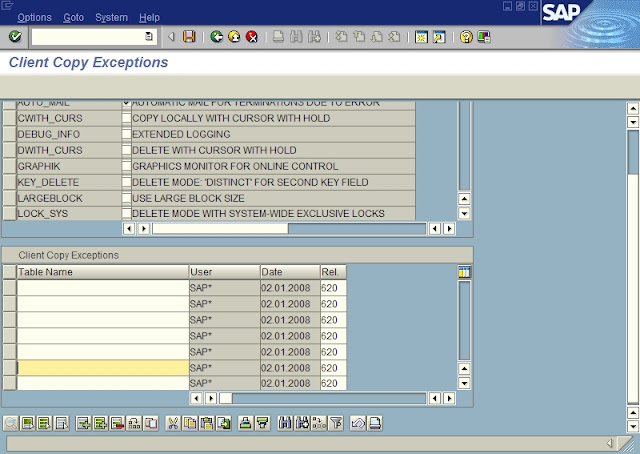
Enter the table you want to exclude and save it
Subscribe to:
Posts (Atom)
Popular Posts
-
SAP Fiori: My Inbox - Troubleshooting + FAQ If you are facing issues setting up or using My Inbox, this document can help you. Frequ...
-
Changing the default trace level of SAP Host Agent SAP Host Agent runs with tracelevel 1 by default. If you need more information to be a...
-
RFC connection test in SM59 might give error similar to this Logon Connection Error Error Details Error when opening an RFC connection Er...
-
 How to export user master and authorization profiles in SAP system? Which tcode is used for user master export in SAP system? Which...
 -
The client copy held between two different databases or two different servers (R/3 systems) is known as Remote Client copy. Remote Client co...
-
SAP Lock Value In USR02 table We use USR02 table for checking the status of an user whether user is locked or not. There are 6 type o...
-
 What is spool overflow ? How to troubleshoot spool overflow ? How to delete old spool requests ? How to avoid spool overflow issue ? ...
 -
Lock user ( unlock ) lock - is a record in the field uflag, "0" - the user is not locked, To Unlock - need to swi...
-
Transport Management System Overview (TMS) Transport Management System is one of the key components in SAP system. TMS is used to control...
-
SAP Solution Manager Setup Diagnostics Agents Перейти к концу метаданных Installation of SMD diagnostics Agent With SWP...


