7/05/2020

SAP Basis - NW Architecture

SAP NetWeaver is one of the central components of the entire SAP software stack and provides you a platform for other components and JAVA and ABAP applications.
SAP Application server consists of multiple application server instances and also database servers. With use of dialog instance, it also contains message server and an enqueue server.
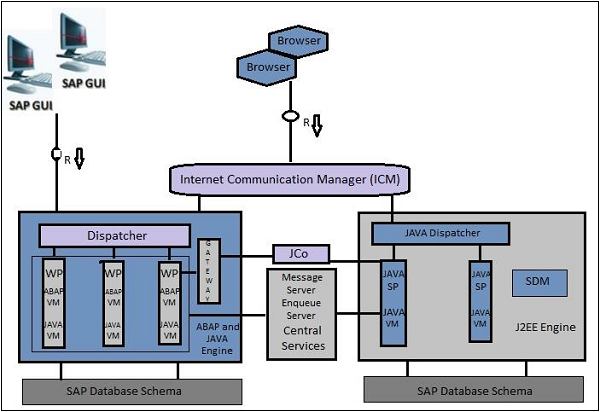
The following is a dialog instance executed by a user −
SAP GUI
These are the different components of the Dialog Instance −
Internal Communication Manager − This is used to process both client and server web requests. It supports protocol – HTTP, HTTPS, SMTP.
Dispatcher − This is used to distribute the user request to different work processes. If all the work processes are busy, requests are stored in the dispatcher queue.
Work Processes − These are used to execute Java or ABAP programs.
SAP Gateway − This provides RFC interface between SAP instances.
Message Server − This is used for message communication and also balances the load in SAP system.

Installation Options for SAP NetWeaver

SAP NetWeaver provides the following installation options −
  • ABAP System − This comes with an integrated VM Container. With this installation, you can run ABAP programs and selected SAP Java applications (shown in left box).
  • Java System − The components to the right in the above image constitute the Java System. With the installation of this, you can run J2EE applications but not any ABAP programs.
  • ABAP + Java system − All the components shown in the above image constitute the ABAP + Java System.

Application Center and Instances

The SAP NetWeaver work center includes the configuration of the following tools −
Adobe Document Services − This allows you to register the Adobe Reader Rights credentials as well as keep track of all unlicensed interactive form designs in your system.
Application Module − This allows you to view the details of the deployed applications and their modules. Here, you can also perform the run-time configuration of the application modules.
Application Resources − This allows you to enable applications to make use of external resources. A NW Administrator can add or delete the application resources.
Authentication and Single Sign-On − This allows you to choose the required authentication mechanism for your applications. You can configure the following authentication and SSO −
  • AS Java as a Service Provider
  • Kerberos
Certificates and Keys − This allows you to manage the AS Java certificates and keys.
Composite Application Framework Authorization Tool − This allows you to manage business rules and Instance Level Permissions for CAF applications, business object nodes and AS Java instances.
Configuration Wizard − You can make technical settings required for the technical processing of a system or a technical scenario.
Destinations − This can be used to specify the remote service's address and the user authentication information for remote connections.
Development Infrastructur − This is required while developing with Java and you want to manage it with Transport Management System (TMS).
Identity Management − This allows you as an administrator to control applications access by creating users and providing these users with a means of authenticating themselves to an application.
Internationalization − This allows you to manage data from double stack systems and also used for synchronization purpose.
Java HTTP Provider Configuration − You can create new virtual hosts and configure existing ones for all registered systems.
Java Class Loader Viewer − You can monitor the hierarchy and references between the class loaders in the AS Java.
Java System Properties − Using this, you can view current system configuration of Application server JAVA and you can edit the properties that are marked as online modifiable.
Java Connection JCo RFC Provider − You can manage the Java Connector Remote Function Call (JCo RFC) Destinations. This allows you to create, edit and view existing connections.
JMS Server Configuration − This is used to create new JMS resources.
Licenses − You can request and install new SAP licenses.
Log Configuration − You can view current log configuration, change security or reset it to default.
Message Server − You can monitor message server parameters and settings.
SAP NetWeaver Administrator Tool − SAP NetWeaver Administrator (NWA) is a web-based tool that allows you to perform configuration, advanced administration, and also to monitor, troubleshoot, and diagnose a SAP NetWeaver system.
You can use NWA tool in the following working modes −
  • Online
  • Local and remote

Managing Java Instances using NWA

Follow these steps to change the status of Java instances at runtime.
Step 1 − Go to SAP NetWeaver Administrator > Operations > Systems > Start & Stop
Step 2 − Now, go to Java Instances tab under NWA.
Step 3 − You can see all available instances with corresponding information about the server processes within the instance.
Step 4 − Select an instance to perform the following functions under NWA −
  • Start, stop or restart a Java instance.
  • Enable or disable debug mode for AS Java processes.
  • View and refresh OS processes.
  • Clear the DNS cache for a particular instance.
  • Set a number of server processes (nodes).

SAP NW System Landscape

Follow these steps to perform the implementation of SAP NetWeaver system −
Step 1 − Plan the implementation by defining the scope, hardware and software requirements, and release instructions.
Step 2 − Define the system landscape for the use cases.
Step 3 − Install the components of SAP NetWeaver system.
Step 4 − Configure SAP NW systems.

System Landscape Management using SAP Solution Manager

SAP recommends the use of the latest version of the SAP Solution Manager to manage your system landscape. You can download the latest version from SAP Support Portal http://support.sap.com/solutionmanager
It is important to correctly define your SAP system landscape in the following versions of SAP Solution Manager to maintain it correctly.

SAP Solution Manager 7.0

You can use the SAP Solution Manager System Landscape transaction code — SMSY for the complete system description.

SAP Solution Manager 7.1 SP01 to SP04

You can use the Landscape Management Database transaction code — LMDB to maintain technical system information. To maintain logical product information, you can use the transaction code — SMSY.

SAP Solution Manager 7.1 SP05 and higher

You can use the Landscape Management Database transaction code — LMDB for the complete system description and in this, transaction code — SMSY is no longer required.

Verifying Landscape with SAP Solution Manager

To verify and correct your system landscape, SAP recommends that you use the verification functions of the following versions of SAP Solution Manager.

SAP Solution Manager 7.0 to 7.1 SP04

Use Landscape Verification 1.0 for SAP Solution Manager. This add-on allows you to identify and correct issues in your SAP Solution Manager landscape (Transaction SMSY) before they cause problems, for example, during a system update. Example for errors are a missing connection to the System Landscape Directory or the incorrect assignment of products to technical systems. For each type of error, a generic description for the solution is provided.

SAP Solution Manager 7.1 SP05 or higher

Use the landscape verification function that is embedded into the product system editor of the Landscape Management Database (LMDB). It replaces the previous Landscape Verification tool.

SAP Basis - NW System

SAP NetWeaver is a web-based, open integration, application platform that serves as the foundation for enterprise service-oriented architecture (enterprise SOA) and allows the integration and alignment of people, information, and business processes across business and technology boundaries. It allows the composition, provisioning, and management of SAP and non-SAP applications across a heterogeneous software environment.
The following table defines the Main Use Cases of SAP NetWeaver and its key area −
Use CaseDescription
Data WarehousingSAP BW
Building Integration scenariosSAP Process Integration PI
Mobilizing Business ProcessesSAP NetWeaver Mobile
Building Composite ApplicationsSAP Composition Environment
Integration with SAP Enterprise PortalSAP Enterprise Portal
Application Development ABAPABAP Development on NetWeaver Application Server ABAP
To implement these use cases, SAP has provided mapping between use cases and SAP NetWeaver software components.
Consider the use case of data warehousing, it has multiple product instances and client tools to use NetWeaver for data warehousing.
Standalone EnginesProduct InstanceClient Tool
Search and Classification (TREX)
  • AS ABAP
  • BW ABAP
  • AS Java
  • NW Product Description [optional]
  • AS Java Extensions [optional]
  • BI Java [optional]
  • EP Core – Application Portal [optional]
  • Enterprise Portal
  • SAP GUI with Business Explorer (BI Add-On)
  • SAP BusinessObjects Analysis, Edition for Microsoft Office* [optional]
  • SAP BusinessObjects Crystal Reports [optional]
  • SAP BusinessObjects Dashboards [optional]
  • SAP BusinessObjects Web Intelligence [optional]
  • SAP BusinessObjects Design Studio [optional]

SAP Basis - Hardware & Software Installation

To implement SAP ERP, we need to find out the minimum hardware and software requirements. The minimum system requirements should be met to perform the implementation successfully.
The following are the minimum requirements for SAP R/3 installation −

Minimum hardware requirements

  • CPU: Intel PIII 500 MHZ
  • HDD: 30 GB
  • RAM: 256MB
  • Ethernet Card for LAN connectivity

Minimum software requirements

  • Windows Server
  • Windows Server Service Pack
  • Internet Explorer
  • Database Software Ex: Microsoft SQL Server
  • SAP R/3 System
  • Report Data CD
  • Export CDs
  • SAP GUI
  • SAP R/3 Kernel CD
  • Dynamic Link Libraries or DLL
  • Active Directory Service Interface or ADSI
  • Microsoft Management Console or MMC

Hardware requirements to install SAP ECC 6.0

  • HDD − 250GB + 45GB Hard Disk Space
  • RAM − Minimum 4 GB of RAM — The more the capacity of RAM, the less time it takes for installation
  • CPU − Intel Dual Core or Core 2 Duo Processor — If you have a 64-bit processor, you can go for ECC 6.0 EHP4 instead of ECC 6.0 SR2.
  • CD Drive to copy the software

Software requirements to install SAP ECC 6.0

  • Windows server 2003 32-bit SP 2 or Windows Sever 2003 64-bit OS.
  • Driver CDs
  • Adobe Acrobat Reader for Installation Manual
SAP ECC 6.0 ides SR2 installation will be completed approximately in 20 hours with the above configuration. The installation time can be reduced further by upgrading hardware configuration like quad 2 core processor with 8 GB ram and 1 TB Hard Disk Drive.
Note − You can download SAP ECC 6.0 free trial from SAP Market place. It is also possible to integrate SAP ECC 6.0 trial using SAP Cloud Appliance Library ACL to AWS or other cloud environment service provider by providing user public cloud key.

Installation of SAP ECC 6.0

Follow these steps to install SAP ECC 6.0 −
Step 1 − Install database as per the requirement. Java JDK 1.4 is the minimum requirement. Copy the software to local drive and run sapinst.exe. Set up wizard will open.
Installing SAP
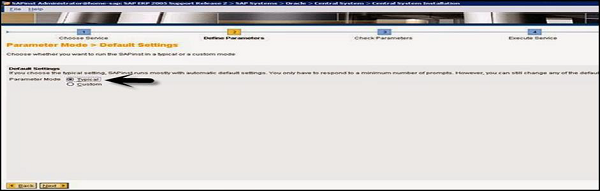
Step 2 − Select the service you want to install — Central System Installation > Select Service Type – Typical or Custom > Next
Central System Installation
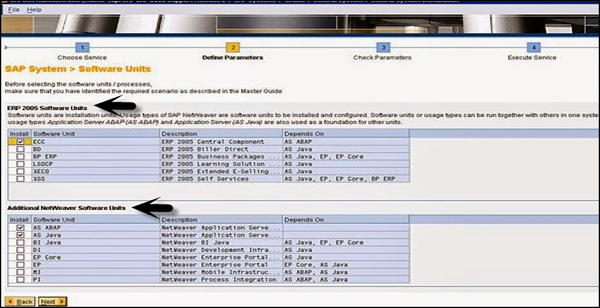
Step 3 − Select the software units you want to install with ECC like Biller Direct and additional NW software units AS ABAP, etc.
Select the Software
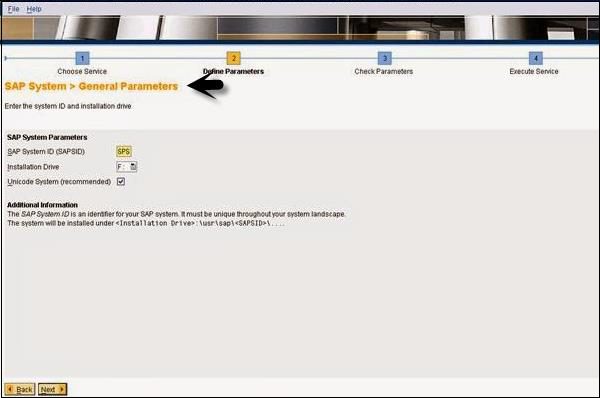
Step 4 − Enter the SAP System ID and Installation drive. SAP System ID is a unique identifier for your SAP system. It must be unique throughout the system landscape. Enter master password which will be used for all user accounts to be created.
SAP General Parameters
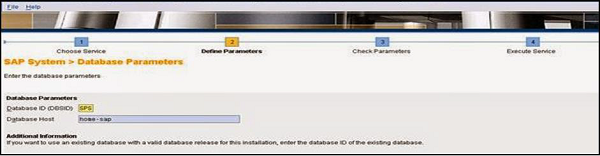
Step 5 − Enter Database parameters like DBSID for an existing database, host name, etc.
SAP Database Parameters
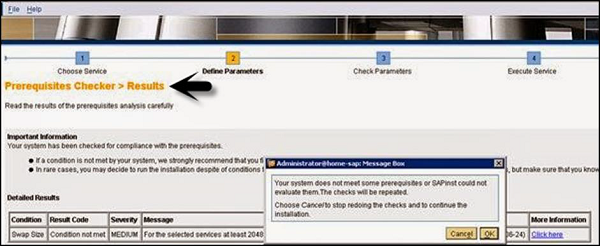
Step 6 − Perform perquisite check. You can click OK to perform check or cancel to move to next step.
Prerequistites Checker
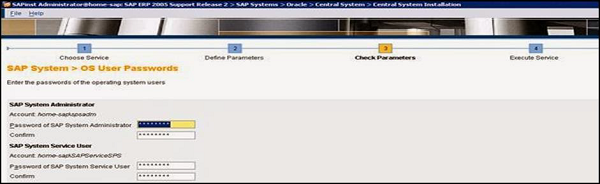
Step 7 − In the next window, you have to provide the location of export files, oracle client and kernel files > Next > Enter OS passwords.
OS User Passwords
Step 8 − Enter the central instance number, which serves as the technical identifier for controlling internal processes such as memory. This number must be unique for this installation.
Step 9 − The system now shows you the port numbers.
Port Numbers
Step 10 − Click Next and you will see the summary of installation.
Step 11 − Enter the Solution Manager key to continue the installation and upgrade process.
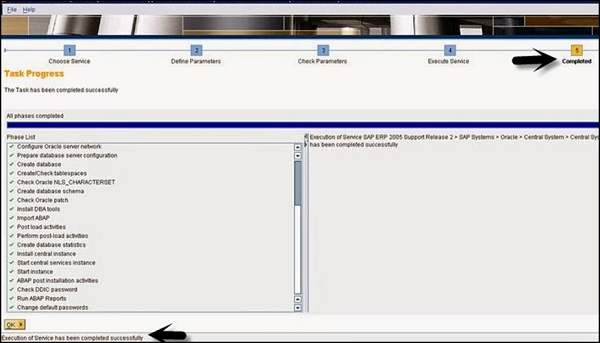
Step 12 − Once the installation is complete, you will receive the following confirmation.
Task Progress

Different Hardware and Software Components in SAP System

The following are the key components in SAP system −
  • Database Server
  • Application Server
  • Other Servers
  • Software components- NetWeaver
  • SAP GUI
  • License key and Maintenance Certificates
  • Enhancement Package
  • Upgrade plans
  • SAP Solution Manager Integration
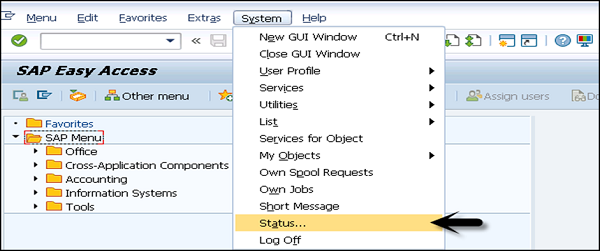
In SAP system, to check the list of the currently installed software component versions, you can go to SAP GUI, select system.
Choose System in SAP logon> System > Status > click the Component Information icon under system data.
SAP Easy Access
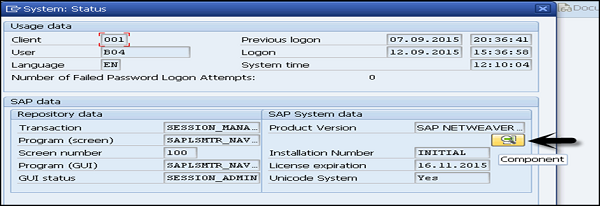
Go to SAP system data → Click on component magnifying glass.
SAP System Status
You can see the following two options −
  • Installed software component versions
  • Installed product versions
Installed Software
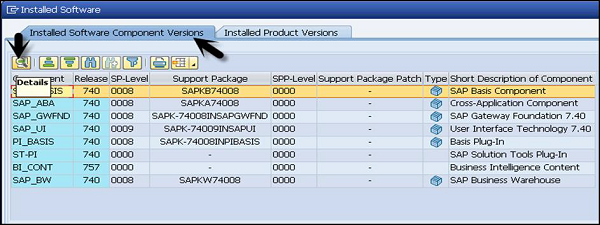
Under installed software component, you can see all the installed software, support package, service pack, description etc. If you want to check the details of each component, you can select the component and go to details tab as shown above.
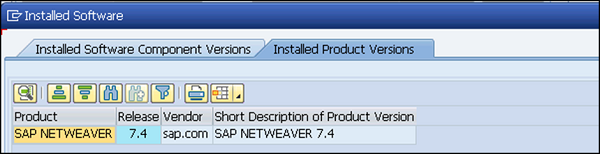
Go to Installed Product Versions, it will show you the version of the installed SAP NetWeaver.
SAP Software Version

System Landscape & Architecture

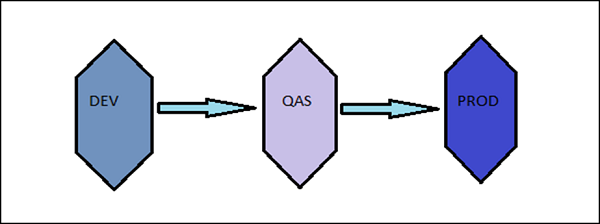
SAP system landscape is defined as an arrangement of SAP servers. Ideally, in a Sap environment, a three-system landscape exists. A system landscape consists of Development Server (Dev), Production Server (PROD), and Quality Assurance server (QAS).
SAP Architecture is defined as a technology framework of SAP system and it changes with time unlike the system landscape. SAP Architecture changes with new software like SAP ECC 6.0, the most recent one.
The following is a request in SAP System Landscape −
DEVELOPMENT >>>> Quality >>>> PRODUCTION
The following figure represents SAP three tier system landscape where work flows from Dev > QAS > PROD and not in backward direction.
SAP Three Tire System
Let us now discuss the system landscape −

Sandbox Server

When a project is implemented, at the initial stages, a sandbox server is used where all the customization, configuration is performed.

Development Server

Next is to save the configuration in development server and saved in workbench requests and this has to be transported to Production server.

Production Server

You can consider it as the final or the most refined stage where the work is done when project is in production/go live. All the changes that are required by the client are performed in the DEV environment and later, the request is transported to production.

SAP System 3 – Tier Architecture

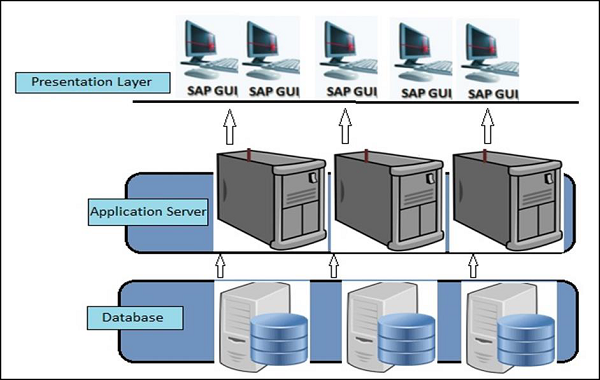
The image given below shows 3-tier architecture of the SAP system. The presentation layer is the topmost one. This contains the device/application to control the SAP system. This can include mobile devices, end user systems or SAP GUI or web browser based client.
3-Tire Architecture
The presentation layer communicates with the application server to perform all the processing and which is known as brains of an SAP system.
An application server consists of multiple instances and communicates with the database layer of the three-tier architecture.
The bottom layer is called the database layer. This is responsible to store all the data. The database of SAP system is kept on a separate server for performance and security reasons.
The presentation layer consists of different components for ABAP and JAVA that enables the communication and processing of data in SAP system.
The key components of the presentation layer include the following −
Message Server − This is used to manage communication between distributed dispatchers in the ABAP system.
Message Server − This is used to manage server processes and JAVA dispatchers. It is used to manage communication within JRE.
Dispatcher Queue − This is used to store multiple work process types.
Dispatcher − This is used to distribute the requests to the work processes.
Memory Pipes − This is used to manage communication between ICM and ABAP work processes.
Enqueue Server − This is used to handle logical locks set by the executed Java application program.
Java Dispatcher − This is responsible to receive the client requests via presentation layer and forward to the server process.
Gateway − This is used to manage communication between SAP system and external systems.
ABAP Work processes − This separately executes dialog steps in R/3 applications separately.SAP system landscape is defined as an arrangement of SAP servers. Ideally, in a Sap environment, a three-system landscape exists. A system landscape consists of Development Server (Dev), Production Server (PROD), and Quality Assurance server (QAS).
SAP Architecture is defined as a technology framework of SAP system and it changes with time unlike the system landscape. SAP Architecture changes with new software like SAP ECC 6.0, the most recent one.
The following is a request in SAP System Landscape −
DEVELOPMENT >>>> Quality >>>> PRODUCTION
The following figure represents SAP three tier system landscape where work flows from Dev > QAS > PROD and not in backward direction.
SAP Three Tire System
Let us now discuss the system landscape −

Sandbox Server

When a project is implemented, at the initial stages, a sandbox server is used where all the customization, configuration is performed.

Development Server

Next is to save the configuration in development server and saved in workbench requests and this has to be transported to Production server.

Production Server

You can consider it as the final or the most refined stage where the work is done when project is in production/go live. All the changes that are required by the client are performed in the DEV environment and later, the request is transported to production.

SAP System 3 – Tier Architecture

The image given below shows 3-tier architecture of the SAP system. The presentation layer is the topmost one. This contains the device/application to control the SAP system. This can include mobile devices, end user systems or SAP GUI or web browser based client.
3-Tire Architecture
The presentation layer communicates with the application server to perform all the processing and which is known as brains of an SAP system.
An application server consists of multiple instances and communicates with the database layer of the three-tier architecture.
The bottom layer is called the database layer. This is responsible to store all the data. The database of SAP system is kept on a separate server for performance and security reasons.
The presentation layer consists of different components for ABAP and JAVA that enables the communication and processing of data in SAP system.
The key components of the presentation layer include the following −
Message Server − This is used to manage communication between distributed dispatchers in the ABAP system.
Message Server − This is used to manage server processes and JAVA dispatchers. It is used to manage communication within JRE.
Dispatcher Queue − This is used to store multiple work process types.
Dispatcher − This is used to distribute the requests to the work processes.
Memory Pipes − This is used to manage communication between ICM and ABAP work processes.
Enqueue Server − This is used to handle logical locks set by the executed Java application program.
Java Dispatcher − This is responsible to receive the client requests via presentation layer and forward to the server process.
Gateway − This is used to manage communication between SAP system and external systems.
ABAP Work processes − This separately executes dialog steps in R/3 applications separately.SAP system landscape is defined as an arrangement of SAP servers. Ideally, in a Sap environment, a three-system landscape exists. A system landscape consists of Development Server (Dev), Production Server (PROD), and Quality Assurance server (QAS).
SAP Architecture is defined as a technology framework of SAP system and it changes with time unlike the system landscape. SAP Architecture changes with new software like SAP ECC 6.0, the most recent one.
The following is a request in SAP System Landscape −
DEVELOPMENT >>>> Quality >>>> PRODUCTION
The following figure represents SAP three tier system landscape where work flows from Dev > QAS > PROD and not in backward direction.
SAP Three Tire System
Let us now discuss the system landscape −

Sandbox Server

When a project is implemented, at the initial stages, a sandbox server is used where all the customization, configuration is performed.

Development Server

Next is to save the configuration in development server and saved in workbench requests and this has to be transported to Production server.

Production Server

You can consider it as the final or the most refined stage where the work is done when project is in production/go live. All the changes that are required by the client are performed in the DEV environment and later, the request is transported to production.

SAP System 3 – Tier Architecture

The image given below shows 3-tier architecture of the SAP system. The presentation layer is the topmost one. This contains the device/application to control the SAP system. This can include mobile devices, end user systems or SAP GUI or web browser based client.
3-Tire Architecture
The presentation layer communicates with the application server to perform all the processing and which is known as brains of an SAP system.
An application server consists of multiple instances and communicates with the database layer of the three-tier architecture.
The bottom layer is called the database layer. This is responsible to store all the data. The database of SAP system is kept on a separate server for performance and security reasons.
The presentation layer consists of different components for ABAP and JAVA that enables the communication and processing of data in SAP system.
The key components of the presentation layer include the following −
Message Server − This is used to manage communication between distributed dispatchers in the ABAP system.
Message Server − This is used to manage server processes and JAVA dispatchers. It is used to manage communication within JRE.
Dispatcher Queue − This is used to store multiple work process types.
Dispatcher − This is used to distribute the requests to the work processes.
Memory Pipes − This is used to manage communication between ICM and ABAP work processes.
Enqueue Server − This is used to handle logical locks set by the executed Java application program.
Java Dispatcher − This is responsible to receive the client requests via presentation layer and forward to the server process.
Gateway − This is used to manage communication between SAP system and external systems.
ABAP Work processes − This separately executes dialog steps in R/3 applications separately.

SAP Basis - Installation of SAP GUI

SAP GUI is a client tool which is used to access remote central server and runs on different operating systems like Microsoft Windows, UNIX, Mac, etc. This is used to manage and access SAP applications like SAP ECC and SAP Business Intelligence System.

Advanced Features in SAP GUI

The following are the advanced features of SAP GUI −

Blue Crystal design

SAP Blue Crystal is a new visual design theme which succeeds Corbu. It provides a consistent design that allows users to seamlessly experience SAP GUI and NWBC elements.
It is the standard theme of Fiori applications and comes with a new color palette and icons which are better scalable.
The background texture has a stroke pattern in white and light blue with a gradient layer.
As it replaces Corbu with Blue Crystal, this integrates SAP GUI for Windows 7.40 and NWBC 5.0

Complete icons redesign for Blue Crystal

All SAP GUI icons used by SAP applications have been redesigned and are now fitting the Blue Crystal Design. Additionally, they are much better scalable than before. The new set of icons is exclusive to Blue Crystal Design.

New default color for Blue Crystal icons

When you use it with patch 2, the main color changes from blue to dark gray in order to harmonize the design with the Fiori Application design.

Supported Available Versions for Different Platforms

The following are the supported available versions for different platforms −
  • SAP GUI for the Windows environment
  • SAP GUI for the Java(TM) environment
  • SAP GUI for HTML / Internet Transaction Server (ITS)
SAP GUI has been released separately for Windows and Java support and the latest version for Windows and Java is 7.4.

Microsoft Windows Release

SAP GUI 7.4, the latest version for Windows was released in October, 2014 and it supports various features like — it is by default installed with NWBC 5.0 and SAP GUI and GUI shortcuts are launched through NWBC.
However, you also have the possibility to use SAP GUI and NWBC in parallel. To do so, you merely have to select the new component Install SAP GUI Desktop Icon/ Shortcuts to install the SAP Logon (Pad) Desktop Icon and to register SAP GUI shortcuts to SAP Logon.

JAVA Release

SAP GUI 7.4 is the latest version for JAVA. This provides support to other operating systems and was released in October, 2014. As SAP GUI for Java 7.40 is not available on DVD right now, you need to proceed to the patches section on the SAP Support Portal to download SAP GUI for Java 7.40.

Downloading SAP GUI from SAP Marketplace

The following are the steps to download SAP GUI from SAP Marketplace −
Step 1 − To use SAP GUI for accessing remote central service, you have to first download it from SAP Market place.
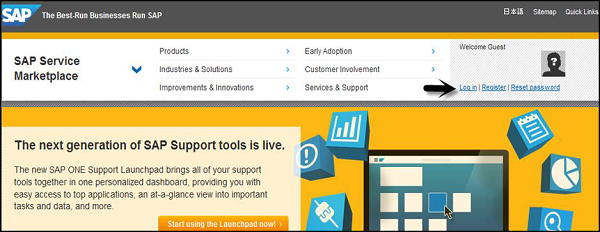
Step 2 − Go to- service.sap.com to login to SAP Market Place.
SAP Service Marketplace
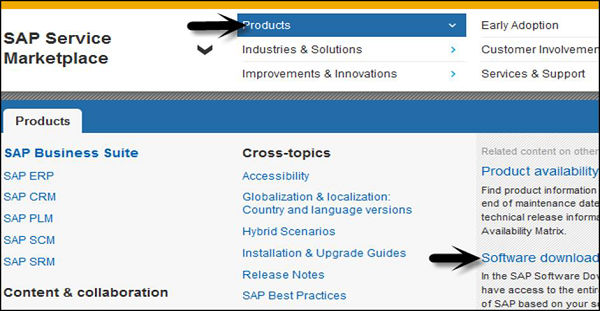
Step 3 − Login using SID SXXXXXXXX and password. Once you login, go to Products > Software Downloads
SAP Service Products
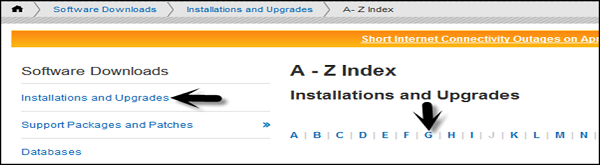
Step 4 − Under Software downloads, go to Installation and upgrades. Follow the alphabetical order A-Z and select ‘G’ from list.
Installations and UpgradesInstallations and Upgrades-G
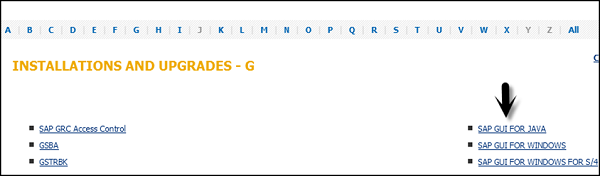
Step 5 − Select platform from the list available, you can select SAP GUI for Windows, SAP GUI for JAVA, and SAP GUI for Windows for S/4. Once you click there, you can see detailed information about all that is there in the latest version of SAP GUI — features, support lifecycle, dependencies, general information, etc. on Info Page.

Support Lifecycle

SAP GUI for Windows 7.40 was shipped in "General Availability" (released for productive usage) on 8th October, 2014. When planning a SAP GUI upgrade, please consider moving directly to release 7.40.
Please consider these end of support dates when planning or reviewing your frontend landscape −
  • On 9th of April 2013 support for SAP GUI for Windows 7.20 ended.
  • On 15th of July 2015 full support for SAP GUI for Windows 7.30 ended.
  • On 31st of October 2015 restricted support for SAP GUI for Windows 7.30 will end.
  • On 9th of January 2018 support for SAP GUI for Windows 7.40 will end.
Also consider, SAP Notes — 147519
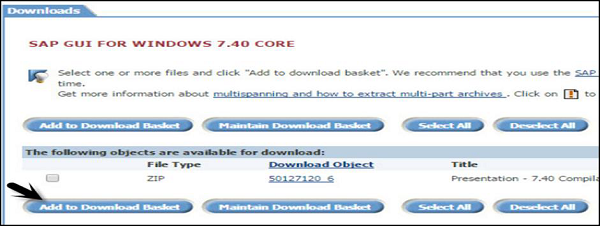
Go to Download ← Select files to add to the download basket.
SAP GUI Windows7
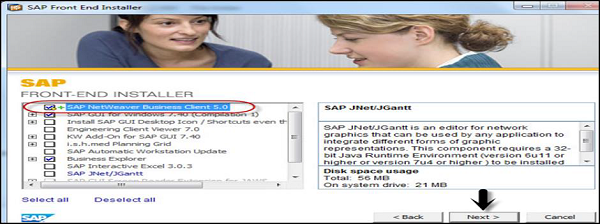
You can get it from the download basket later on. Save the file to the local system and run the setup. You can select to choose from different components −
SAP Front End

What is SAP Basis

SAP Basis refers to the administration of SAP system that includes activities like installation and configuration, load balancing, and performance of SAP applications running on Java stack and SAP ABAP. This includes the maintenance of different services related to database, operating system, application and web servers in SAP system landscape and stopping and starting the system.
The key responsibilities of SAP Basis Administrator include −
  • System installation and Configuration
  • Load balancing on servers
  • Performance management of different components
  • Managing interfaces and integration with servers
  • Managing servers and different services
With the help of SAP Basis, different SAP modules like Finance Accounting, Production Planning, Sales and Distribution, SAP EWM and other modules can integrate and communicate with each other.
SAP Basis supports the installation and configuration of SAP applications on different operating systems like Windows, Unix, AS/400, etc. and different databases like SQL Server, Oracle, IBM DB2 for back end database.
SAP Basis Consultant
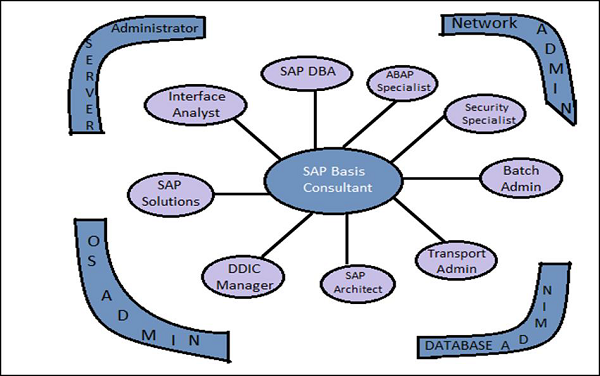
This picture defines the key activities that involve the role of SAP Basis Consultant. The roles of the SAP Basis Consultant are divided into the following categories −

Solution Specialist

The Solution Specialist is responsible for −
  • Upgrading the SAP version of system landscape
  • SAP Data backup archive
  • Migration of Operating system and Database
  • Installation of AP/Add On

Interface Analyst

The Interface Analyst is responsible for −
  • Configuration and set up of interface between different modules

System Administrator

The System Administrator is responsible for −
  • Monitoring the performance of SAP system and modules
  • Maintaining SAP system health and performing health checkup

SAP Database Administrator

The SAP Database Administrator is responsible for −
  • Backup and restoring the database of SAP system
  • Managing database objects

Transport and Batch Job Administrator

The Transport and Batch Job Administrator is responsible for −
  • Managing batch job scheduling and replication
  • Managing SAP Control access in system landscape

DDIC Manager

The DDIC Manager is responsible for −
  • Managing changes to Data Dictionary

SAP Architect

The SAP Architect is responsible for −
  • Designing work and data flow in the SAP system
  • Managing SAP sizing

SAP ABAP Specialist

The SAP ABAP Specialist is responsible for −
  • Troubleshooting and tuning of ABAP Programs
  • Applying correction to Programs as per SAP
  • Coding and customization of ABAP program as per requirement

Transaction Codes

There are various Transaction Codes (T-codes) that a SAP Basis Administrator uses to perform the assigned tasks. The following is a list of important SAP Basis T-codes −
SM02 − To send messages to users who are logged in and new users logging to the client.
SM01 − To take control of transaction codes. In case, the business requires that the users who are authorized to carry the transactions are to be stopped temporarily.
SM04 − To check the number of users who are logged into the system and in which client and how many sessions each user is generated and in each session what transaction is being executed.
SM13 − To keep track of the status of the Update service is Active, in case it is not active then we activate from the Update Administrator
SM37 − To monitor the status of the jobs that are created by a user and for specific dates.
PFCG − This is used to maintain roles in SAP system.
SM21 − SAP system log is displayed for the values inputted in the initial screen. The values that can be maintained is the From Date.
RZ20 − This is used for cross system monitoring. In this transaction, we have a tree structure that performs a set of transactions and also keeps a track of all the alerts that were captured during the operation of the system

Popular Posts